

 English
 中文简体
中文简体
Industry News
Home / News / Industry News / Complete Forklift Load Cell Guide: How It Works, Selection & Installation
Content
A warehouse that loads 40 pallets per shift and weighs each one on a floor scale at the end of the aisle is spending three to six minutes of every handling cycle on moving, queueing, and waiting. A forklift load cell eliminates that trip entirely: the forks or the fork carriage become the weighing element, and the operator reads the load weight from an in-cab indicator while the pallet is still in the air. In most operations, the hardware pays for itself in one to three months.
A system consists of one or more load cells mounted on the forks or carriage, a junction box that sums and corrects their signals, an in-cab weight indicator, and the interconnecting cable. It works on the same strain-gauge principle as a platform scale, but it has to survive shock loads, mast vibration, washdown water, and temperature swings that a stationary scale never experiences. That environment changes how you specify, fit, and service the equipment.
This guide covers the working principle of forklift load cells, common mounting configurations, realistic accuracy and capacity targets, selection criteria, installation and calibration practice, typical costs and payback, and the maintenance routine that keeps readings dependable over years of warehouse use.
A forklift load cell is a metal force sensor that bends by a few micrometers under load, and strain gauges bonded to that metal convert the deformation into a proportional electrical signal. The cell body is usually alloy steel or stainless steel. Inside, foil gauges are arranged in a Wheatstone bridge. When the forks lift a pallet, two gauges stretch and two compress; the bridge becomes unbalanced and produces a millivolt output that varies linearly with the applied force.
That millivolt signal is too small and too sensitive to send directly to a display over a long cable, so in most systems it first passes through a junction box that combines the signals from the individual cells. The combined signal then travels to an in-cab indicator, which amplifies, filters, and converts it to a digital weight, applies calibration factors, and shows the result on the operator display. Digital load cells build the analog-to-digital converter directly into the cell housing, which keeps the measurement clean over long cable runs and reduces interference from the truck's drive motor.
For a deeper look at the electronics behind the reading, you can read our earlier explanation of the working principle of a weighing sensor. The table below summarizes the signal chain in a typical forklift weighing system.
| Stage | Component | Function | Typical output |
|---|---|---|---|
| 1 | Load cells on forks or carriage | Convert lifting force into an electrical signal | 2 mV/V analog or digital bus |
| 2 | Junction box | Sums and trims the signals from each cell | Corrected analog or digital signal |
| 3 | In-cab weighing indicator | Amplifies, digitizes, and displays weight | kg or lb reading, tolerance alarm |
| 4 | Software or fleet system | Logs weights, alerts on thresholds, records history | CSV, RS-232, RS-485, Ethernet |
The main benefit is simple: an onboard weighing system removes the trip to the scale from your process. Instead of carrying every load to a weighbridge or floor scale, the operator gets the weight during the normal lift cycle and can act on it immediately. In high-throughput operations, the savings are large enough to change shift schedules and loading dock design.
| Process step | Without onboard weighing | With forklift load cell |
|---|---|---|
| Travel to floor scale | 1 to 4 minutes round trip | None |
| Queueing at scale | 0 to 10 minutes in busy shifts | None |
| Positioning and lifting on scale | 30 to 60 seconds | Weight appears during normal lift |
| Reading and recording | 20 to 30 seconds | Shown in cab, auto-recorded |
| Total per pallet | About 2 to 6 minutes | About 10 to 15 seconds |
The mounting configuration matters more than the brand of load cell. It defines the force path from the pallet to the sensor, and therefore how accurate and repeatable the system can be. Three configurations cover almost all forklift types.
| Mounting type | How it works | Best suited to | Typical accuracy |
|---|---|---|---|
| Fork-mounted | Each fork carries its own load cell; the two forks combine for total weight | Pallet trucks, reach trucks, narrow-aisle trucks | 0.3% to 0.5% of load |
| Carriage-mounted | Load cells sit between the carriage and the fork mounting plate | Trucks with rotators, clamps, and side shifters | 0.5% to 1% of load |
| Frame or mast-mounted | Compression cells are placed in the mast or below the carriage to weigh the whole lifting structure | Heavy counterbalance trucks and very large capacities | About 1% of load |
Analog cells with a 2 mV/V output are broadly compatible across brands and cheap to replace. Digital cells convert the signal inside the sensor, giving higher noise immunity and easier corner trimming in multi-cell installations. Long cable routes from the mast to the cab, plus the presence of variable-frequency drive motors, clearly favor digital output.
For frame-mounted and mast-mounted systems, compression-type cells are the standard choice. The Jiuding column-type digital load cell is designed and tested for heavy forklift and truck applications, and its digital output remains stable over long cable routes. It is the cell we recommend when the mast itself carries the load path.
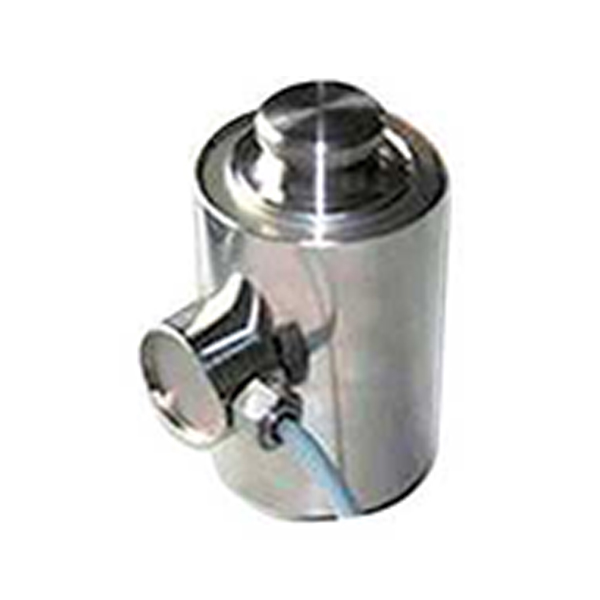 Column Type Digital Load Cell for Forklift and Truck ScalesThis compression-type load cell supports 10t to 50t capacities with digital output for stable long-distance transmission. It suits mast-mounted systems and includes protection against voltage and interference.View Product →
A well-installed forklift load cell system holds 0.3 percent to 1 percent of the applied load, with 0.5 percent as the common working figure in daily operation. On a 2,000 kg weighing system, that means about plus or minus 10 kg at full load. Reaching the tighter end of that range depends on calibration quality, mounting condition, and how smoothly the operator lifts the load.
The factors that pull a reading away from the true weight are worth knowing before you choose a system:
| Truck rated capacity | Typical load cell capacity | Reason |
|---|---|---|
| 1.0 to 1.5 t pallet truck | 1.5 to 2 t | Fork-mounted cells need margin for shock |
| 2.0 to 2.5 t counterbalance truck | 3 t class | Covers attachments and off-center loads |
| 3.0 to 3.5 t counterbalance truck | 4 to 5 t class | Safety margin for dynamic lifting forces |
| 5.0 t and above | 10 t class compression cell | Frame-mounted systems need high stiffness |
Start from the truck, not from the load cell. Six selection criteria will cover almost every decision, and they should be checked in the order below.
The indicator is the part the operator looks at every shift, so it deserves as much attention as the cell. The Jiuding 823S digital weighing display is built for vehicle mounting, with a bright readout and simple keys that operators can learn in minutes. It pairs cleanly with both analog and digital load cells and is a practical default for single-truck retrofits.
 Jiuding 823S Digital Weighing Display for Vehicle MountingA practical indicator for forklift retrofits, the 823S features a bright readout and simple keys. It works with analog and digital cells, making it a straightforward choice for operators.View Product →
Installation quality decides the accuracy. A load cell only measures the force that passes through its own mounting path, so a bracket that shifts, a bolt that loosens, or a cable that pinches will show up immediately in the readings. A careful fitter can complete a single truck in four to eight hours.
Calibration has three parts: zero, span, and corners. Zero is set with the forks empty and raised to mast midpoint. Span is adjusted by placing a known reference weight on the forks and correcting the indicator until it displays the true value. Corner adjustment trims the individual load cells so that the same weight gives the same reading whether it sits on the left fork, the right fork, or the center. After any mechanical repair or cell replacement, the full procedure should be repeated. Many fleet managers book a formal calibration after installation through the manufacturer's calibration and verification service so that the system is checked under real lifting conditions before it enters daily service.
Modern forklift weighing systems can do more than display a number. Through the indicator, weight data can be sent over RS-232, RS-485, or Ethernet to a warehouse management system, a printer, or a cloud platform. With IoT-enabled sensors, the weight can be transmitted directly from the mast to the network the truck already uses for telematics. That makes it possible to automate tare values, produce delivery notes in real time, flag overload events, and monitor the weighing system health itself.
For fleets that already run telematics, an IoT-enabled clamp metal weighing sensor is the fastest way to add weighing data: it clamps onto the mast, transmits the weight value over the existing network, and removes one layer of cable installation. It is a good fit when you want to centralize weighing records without opening up the mast wiring.
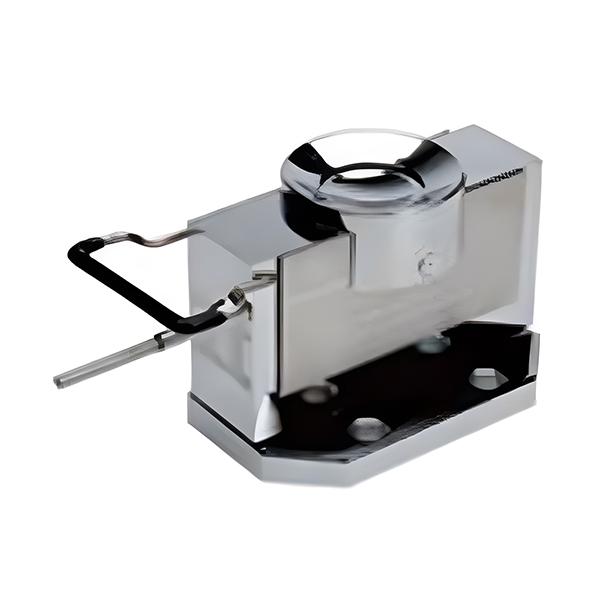 IoT Clamp Metal Weighing Sensor with Digital OutputThis alloy steel sensor clamps onto the mast, transmits weight via IoT networks, and offers automatic centering and four-corner calibration. Its digital signal resists interference and cheating.View Product →
In busy operations, the expected payback is one to three months; in very active warehouses, it can be under one month. Recent retrofit projects in Europe and Asia with analog cells and a basic cab display typically fall in the range of USD 1,500 to USD 4,500 per truck including installation, depending on truck type and configuration. Digital and IoT-enabled systems sit at the upper end of that range.
| Cost component | Typical range |
|---|---|
| Load cell set for forks or carriage | USD 400 to 1,200 |
| Junction box and cable kit | USD 150 to 400 |
| In-cab weighing indicator | USD 200 to 700 |
| Mounting hardware | USD 100 to 300 |
| Installation labor, 6 to 8 hours | USD 300 to 600 |
| Deadweight calibration | USD 200 to 500 |
| Total per truck | USD 1,500 to 4,500 |
A straightforward payback example shows why the business case is easy to justify. Assume 40 lifts per day, a conservative saving of four minutes per lift, and a blended cost of USD 20 per hour for the operator and the truck. The saving is about USD 53 per day, or roughly USD 1,170 per month for a single shift. Against an average installed cost of USD 2,500, the system pays back in about two months. If the same truck runs two shifts, the payback period halves.
There are also savings that do not appear in the simple calculation: fewer floor scales to calibrate and maintain, less product damage from overloaded masts, better load security in transport, and a digital record that removes disputes over delivered quantities.
Most forklift load cell problems are caused by cables, moisture, or mechanical damage, not by the sensing element itself. A short troubleshooting table covers the failures that account for the vast majority of service calls.
| Symptom | Likely cause | Remedy |
|---|---|---|
| Weight drifts after the truck warms up | Moisture inside a connector or cell | Inspect and dry connectors, replace damaged seals, recalibrate |
| Corner readings differ by more than 0.5 percent | Bent fork or loose adapter plate | Check mechanical alignment, re-torque, trim junction box corners |
| Display jumps intermittently | Damaged mast cable or connector | Trace the cable path, repair or replace damaged section |
| Reading responds slowly | Excessively long filter or electrical interference | Reduce filter setting, improve cable shielding and grounding |
| Zero no longer returns after unloading | Overload or impact damage to the cell | Bench-test the cell, replace it, and recalibrate |
Preventive maintenance is simply structured and does not require a specialist for every shift. The routine below keeps the system within its working accuracy and catches small faults before they become a total failure.
A properly installed system typically holds 0.3 percent to 1 percent of the applied load, with 0.5 percent as the common working figure. On a 2,000 kg system, that means an expected tolerance of about plus or minus 10 kg at full load. Accuracy depends on calibration quality, mounting condition, and lifting smoothness more than on the cell price.
Most counterbalance trucks, reach trucks, and pallet trucks can be retrofitted, but you must verify fork dimensions, carriage class, mast free-lift, and cable clearance. Trucks fitted with rotators, clamps, or side shifters usually need a carriage-mounted configuration instead of fork-mounted cells.
For a single truck, mechanical and electrical installation typically takes four to eight hours, followed by one to two hours of calibration. Trucks with complex mast cable paths or additional attachments can take a full day. Digital and IoT systems usually take less wiring time.
Yes. Recalibration is required after mechanical repairs, after replacing a cell or cable, after a suspected overload event, and at least quarterly in heavy-duty sites. A simple zero check with empty forks should be done daily, and a known-weight check weekly.
Yes, when the cells, connectors, and junction box carry an IP65 or IP67 rating. Washdown environments favor stainless steel cells, and explosion-protected versions are available for locations where flammable gases or dust may be present.
Yes. Digital and IoT-enabled systems can transmit weight over RS-232, RS-485, Ethernet, or cloud-based interfaces. Each lift can be logged with a timestamp and operator ID, which removes manual data entry and supports real-time inventory control.
The load cell is the sensing element that converts force into an electrical signal. The scale, or weighing system, is the complete package: load cells, mounting hardware, junction box, cable, in-cab indicator, and calibration. You cannot get a usable weight from a load cell alone.
Typical signs include a permanent shift in zero, non-linear readings across the range, cracked paint or deformed adapter plates, and readings that do not settle. The cell should be bench-tested with no load, and replaced if the output does not return to the original zero point.
The best time to install a forklift load cell is when you can already name the task it will eliminate: a trip to the scale, a shortage dispute, or a loading error that happens once a week. Choose the right capacity, mount the cell cleanly, calibrate it with real reference weights, and connect the data to the same record-keeping system your warehouse already uses. Done that way, an onboard weighing system stops being an accessory and becomes part of the production process.
Among the configurations discussed here, column-type digital load cells give heavy counterbalance trucks the strongest construction and the cleanest signal to the cab; the 823S weighing display keeps the operator interface simple and readable; and IoT clamp metal weighing sensors are the shortest route from the mast to your warehouse management system. Review the product references in this guide, verify the dimensions on your own trucks, and start with one machine where the saved time is easiest to measure.
Copyright © Ningbo Jiuding Weighing Equipment Co., Ltd.